PowerPoint Copilot vs. AI-Native Platforms: Redefining the Modern Workflow
PowerPoint is still one of the most familiar presentation tools in the world. For many enterprise teams, it is already part of the daily workflow: meetings, sales decks, quarterly reports, product updates, training materials, and executive briefings.
That is why Microsoft Copilot feels like a natural upgrade. Instead of asking teams to leave PowerPoint, Copilot adds AI assistance inside a tool they already know.
For many users, that is useful.
But adding AI to an existing slide editor is not the same as building an AI-native presentation workflow.
Modern teams are not only asking, “Can AI help me edit slides faster?” They are asking a bigger question: “Can AI help me think, structure, write, design, and refine the entire business presentation?”
That is why some teams begin looking for a PowerPoint Copilot alternative. They do not simply want AI inside legacy software. They want an AI-native presentation platform that can support the full creation process from idea to business-ready deck.
Pi, short for Presentation Intelligence, is built for that newer workflow. Instead of treating AI as an add-on to slides, Pi uses multi-agent AI to help teams create presentations with stronger structure, better business logic, premium visual direction, and more flexible collaboration.
Where PowerPoint Copilot Fits Best
PowerPoint Copilot works best when your team already lives inside the Microsoft ecosystem.
If your files are in Microsoft 365, your team collaborates through Teams, and your company already uses PowerPoint for most presentations, Copilot can help reduce friction. It can assist with rewriting content, summarizing information, generating slide drafts, and improving existing decks.
This makes Copilot useful for teams that want AI support without changing their workflow.
It is especially helpful when the presentation already has a clear direction. If you have a document, meeting notes, or an existing PowerPoint file, Copilot can help turn that material into a better draft or improve what is already there.
That is a real advantage.
But the more complex the presentation becomes, the more teams may notice the limits of adding AI to a traditional slide tool.
PowerPoint was originally built for manual slide creation. Copilot can make that process faster, but it does not fully change the foundation of the workflow. Many teams still need to plan the story, organize the logic, refine the structure, control the design, and adapt the deck for different audiences.
That is where AI-native platforms start to feel different.
The Workflow Gap: AI Add-On vs. AI-Native Creation
The key difference is not whether a tool has AI. The key difference is where AI sits in the workflow.
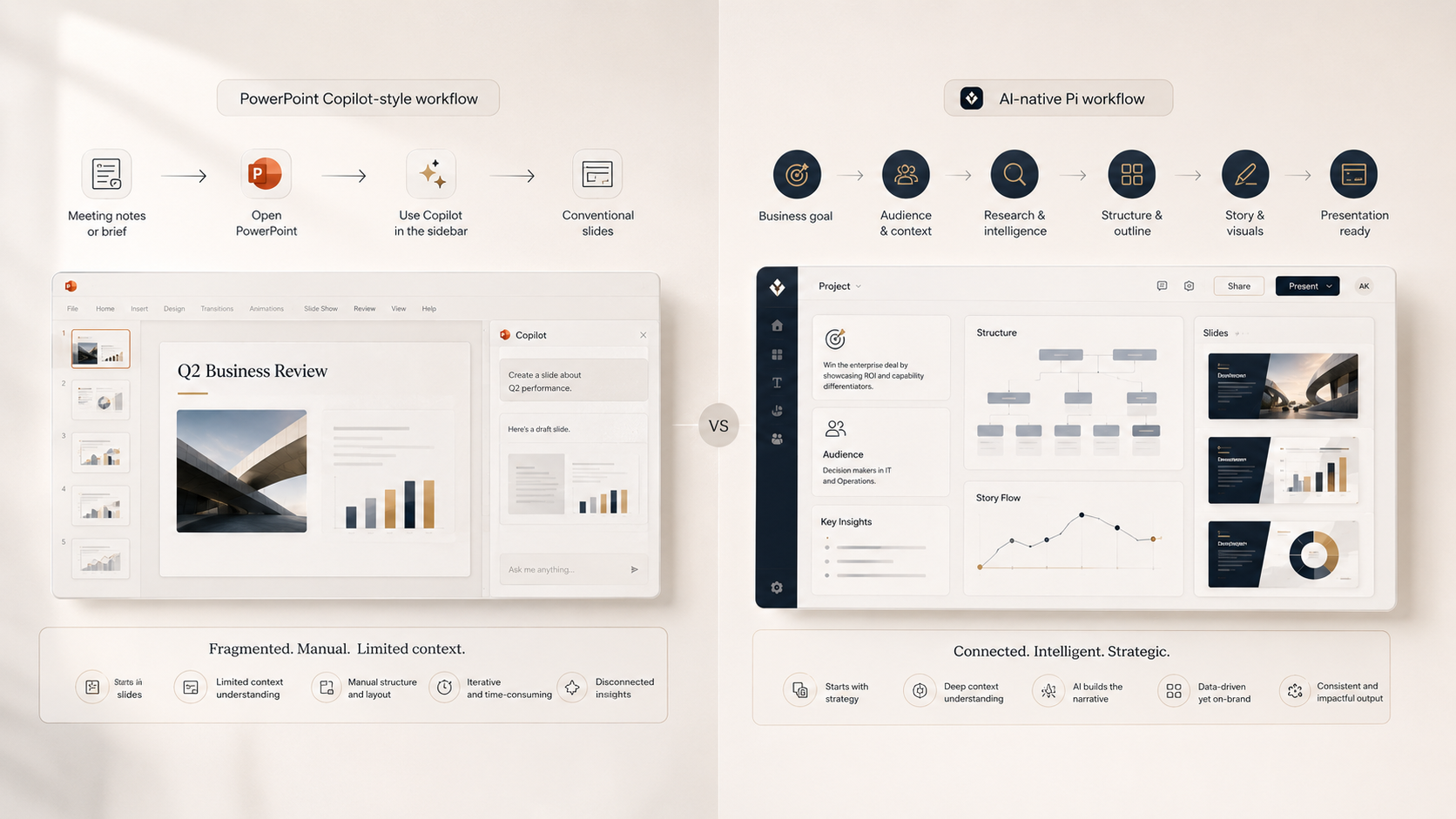
In a traditional workflow, users usually start with slides. They create pages, add text, adjust layouts, insert charts, and polish the deck. AI can help with some of these steps, but the structure still depends heavily on the user.
In an AI-native workflow, the presentation does not begin as a pile of slides. It begins with the business goal.
What is the deck trying to achieve? Who is the audience? What does the reader need to believe? What evidence supports the message? What visual direction fits the situation?
For high-stakes presentations, these questions matter more than slide formatting.
A pitch deck needs a persuasive investor narrative. A sales deck needs to connect customer pain to product value. A strategy report needs to turn analysis into decisions. An executive briefing needs to make priorities clear enough for action.
An AI-native presentation platform should help with that deeper work, not just help users edit slides faster.
What to Look for in a PowerPoint Copilot Alternative
A strong PowerPoint Copilot alternative should not simply generate slides outside PowerPoint. It should offer a more modern way to create business presentations.
First, it should support business structure. Teams need help organizing research, insights, arguments, and recommendations into a clear deck flow.
Second, it should support content development. Strong presentations require more than short bullet points. They need clear messaging, audience-specific wording, and a logical progression from problem to recommendation.
Third, it should support visual direction. Business decks need to look credible, polished, and appropriate for the audience. A board presentation, sales proposal, investor update, and product launch deck should not all look the same.
Fourth, it should support collaboration across teams and languages. Enterprise presentation work often involves multiple departments, regions, and stakeholders. The right AI presentation maker should help teams move faster without losing clarity or polish.
The goal is not to replace PowerPoint for every possible use case. The goal is to choose the right workflow for the kind of presentation you need to create.
How Pi Redefines the AI Presentation Workflow
Pi is built for teams that need more than slide editing assistance.
Instead of treating AI as a helper inside a legacy editor, Pi approaches presentation creation as a complete business communication workflow. It supports the work behind the deck: research, structure, copywriting, visual direction, and final polish.

1. Multi-Agent AI for Deeper Presentation Thinking
Strong presentations require different types of work.
Research is not the same as writing. Writing is not the same as structure. Structure is not the same as design. A single prompt can create a draft, but serious business decks often need deeper thinking across all of these layers.
Pi uses multi-agent AI to support different parts of the process. One layer can help organize information. Another can help shape the story. Another can support copy and visual direction.
This makes Pi useful for presentations that need more than quick slide output, including pitch decks, sales decks, consulting reports, executive summaries, and strategy presentations.
2. From Slide Editing to Business Workflow
PowerPoint Copilot is helpful when users already know what they want to say and need assistance improving or generating slides.
Pi is more useful when the team is still shaping the message.
For example, a team preparing an enterprise sales deck may need to clarify customer pain, define the value proposition, organize proof points, and create a persuasive narrative before the slides are finalized. A strategy team may need to turn market research into a recommendation. A founder may need to turn scattered notes into a pitch deck that investors can follow.
Pi helps teams move from raw information to structured presentation logic. The workflow is not just “make this slide better.” It is “help us build the deck correctly.”
3. Premium Visual Direction for Business-Ready Decks
Design still matters, especially in professional settings.
A business deck does not need to be flashy, but it does need to feel credible. A generic slide design can weaken the message, even when the content is strong. High-stakes decks need visual hierarchy, business-grade aesthetics, and a style that fits the audience.
Pi helps teams create presentations with premium visual direction. That means the deck can feel more polished, more intentional, and more appropriate for business use than a basic AI-generated slide draft.
For teams creating client proposals, leadership updates, product strategy decks, or investor presentations, that level of polish can change how the message is received.

PowerPoint Copilot vs. Pi: Legacy AI Add-On or AI-Native Platform?
| Need | PowerPoint Copilot | Pi |
|---|---|---|
| Existing workflow | Best inside Microsoft 365 and PowerPoint | Best for AI-native presentation creation |
| Starting point | Works well with existing slides or documents | Works well with ideas, research, and goals |
| Story structure | Helps rewrite and summarize content | Helps build deck logic before slides |
| Business use cases | Speeds up familiar PowerPoint drafts | Builds pitch decks, sales decks, and reports |
| Design output | Polishes slides within PowerPoint | Creates premium, business-ready decks |
| AI depth | Assists the slide-editing process | Supports research, structure, copy, and design |
The difference is not simply which tool has AI. It is whether AI is added to an existing editor or built into the foundation of the presentation workflow.
The Verdict: AI-Native Workflows Are Changing Presentation Creation
PowerPoint Copilot is useful for teams that already work deeply inside Microsoft 365 and want AI help within a familiar tool. It can save time, improve drafts, and make PowerPoint workflows more efficient.
But modern business presentations often need more than faster slide editing.
They need stronger logic, better structure, audience-aware messaging, premium aesthetics, and a workflow that supports the full journey from idea to finished deck.
That is where AI-native platforms like Pi offer a different path. With multi-agent AI, business-ready structure, and premium visual direction, Pi helps teams move beyond editing slides and toward building better presentations from the start.
If your team needs more than an AI assistant inside legacy software, try Pi for free and create a business presentation with an AI-native workflow.
Frequently Asked Questions (FAQ)
Q: What is the best PowerPoint Copilot alternative for business presentations? A: The best PowerPoint Copilot alternative depends on your workflow. If your team wants AI inside Microsoft PowerPoint, Copilot can be useful. If you need an AI-native presentation platform with stronger structure, multi-agent AI, and premium visual direction, Pi is a strong option.
Q: Is Microsoft Copilot good for creating presentations? A: Microsoft Copilot can help users draft, summarize, rewrite, and improve presentations inside the Microsoft ecosystem. For teams that need deeper business logic, structured storytelling, and a more complete AI presentation workflow, an AI-native platform may be a better fit.
Q: What does AI-native presentation platform mean? A: An AI-native presentation platform is built around AI from the beginning. Instead of adding AI to a traditional slide editor, it supports research, structure, writing, design direction, and final deck creation as part of one workflow.
Q: Why choose Pi instead of PowerPoint Copilot? A: Choose Pi if your team needs more than slide editing assistance. Pi helps teams build business-ready presentations with multi-agent AI, structured deck logic, premium aesthetics, and a workflow designed for modern presentation creation.